
A technical SEO site audit is one of the best ways to understand why a website is underperforming in search. It helps uncover crawl issues, indexability problems, broken pages, weak internal structure, slow performance, missing metadata, poor mobile usability, and technical errors that can hold rankings back. The goal is not just to produce a long report, but to turn findings into a practical action plan that improves the site over time.
My own workflow starts with crawling the website, validating technical issues with multiple tools, documenting everything clearly in Google Docs, then converting the findings into a phase-based action plan that I work through one item at a time. This process keeps the audit useful for both website owners and implementation teams.
Tools I use for a technical SEO audit
I mainly use Screaming Frog SEO Spider to crawl the site and identify technical issues at scale, Google PageSpeed Insights to evaluate page speed and user experience, SEO Site Checkup for additional technical checks and page-level validation, and Semrush Site Audit when I want another strong layer of crawl-based diagnostics and issue prioritization.
Screaming Frog
Best for status codes, broken links, metadata audits, heading checks, canonicals, crawlability, and large-scale technical SEO analysis.
Google PageSpeed Insights
Best for Core Web Vitals context, image delivery issues, render-blocking resources, caching opportunities, and layout stability problems.
SEO Site Checkup
Useful for quick validation, HTML size checks, compression review, and additional page-level technical SEO diagnostics.
Semrush Site Audit
Helpful for site health scoring, issue prioritization, page-level errors, warnings, and a more structured technical to-do list.
Step 1: Crawl the website with Screaming Frog
I usually begin with a full crawl in Screaming Frog because it gives a strong overview of how the website is built. This is where I check status codes, broken links, redirect chains, indexability, canonical tags, missing metadata, duplicate headings, thin pages, and other technical signals that are easy to miss when reviewing pages manually.
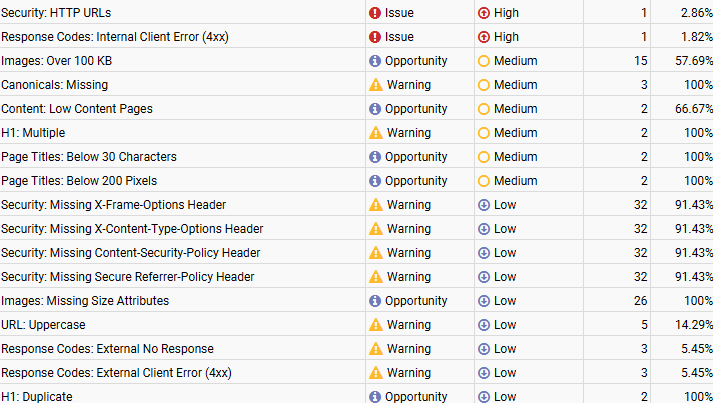
Starting with a crawl gives you a site-wide foundation instead of relying on assumptions. It helps you understand whether the main problems are technical, structural, content-related, or a mix of all three.
Step 2: Review technical SEO issues by priority
Once the crawl is complete, I review the issues that most directly affect accessibility, crawlability, and indexation. This typically includes robots.txt, XML sitemap setup, heading hierarchy, Google Search Console connection, 404 pages, mobile-friendly URLs, text-to-HTML ratio, structured data, schema implementation, and page load speed.
- Check whether robots.txt is blocking important content
- Review the XML sitemap for wrong or non-indexable URLs
- Look for broken pages, redirect issues, and 4xx errors
- Validate canonical tags and indexability signals
- Review heading structure and duplicated H1 or H2 usage
- Check schema and structured data implementation
- Confirm Google Search Console is connected correctly
- Assess mobile usability and clean URL structure
- Review speed and rendering bottlenecks
Step 3: Use Semrush to spot broader audit patterns
After the crawl, I often validate issues with Semrush because it helps prioritize technical problems in a more structured site-audit format. It is especially useful for highlighting recurring patterns across the site such as HTTP URLs, internal client errors, missing canonicals, oversized images, multiple H1s, duplicate H1s, weak title lengths, uppercase URLs, and missing security headers.
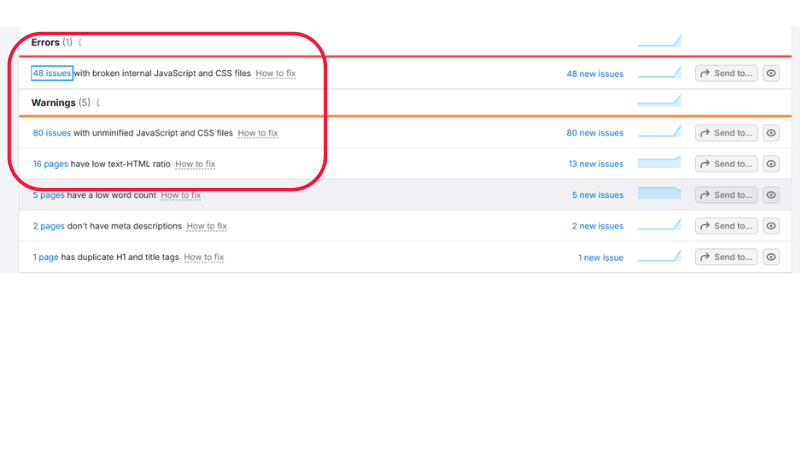
That kind of summary makes it easier to identify what is affecting the site most and what should be fixed first.
Step 4: Check speed and performance with PageSpeed Insights
Technical SEO is not only about crawl errors. Performance has a direct impact on user experience and can also affect how efficiently search engines interact with the site. That is why I run important URLs through PageSpeed Insights to identify slow scripts, image bloat, unused CSS, missing image dimensions, poor caching behavior, and render-blocking requests.
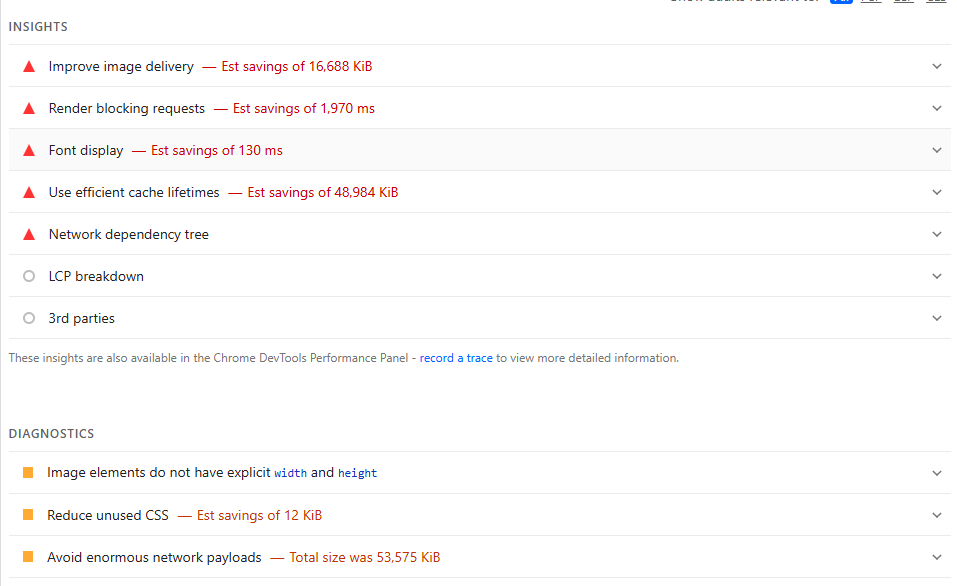
If load speed is weak, the audit should not stop at “the site is slow.” It should explain what is making it slow and which fixes are likely to create the biggest improvement.
Step 5: Validate additional speed findings with SEO Site Checkup
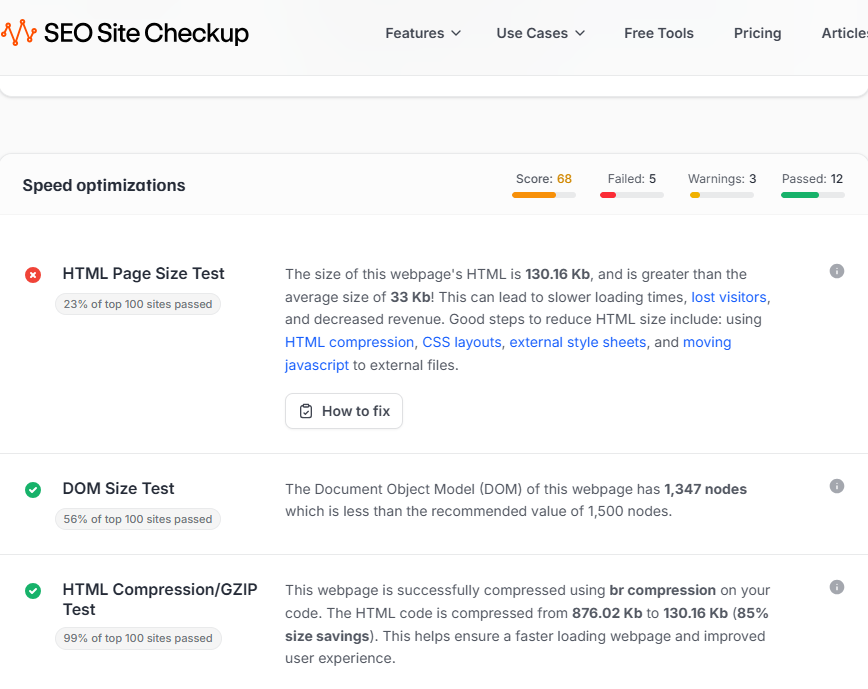
I also use SEO Site Checkup as another layer of validation. It can be helpful for quickly reviewing HTML page size, DOM size, compression, and general speed optimization findings. Sometimes it confirms what the other tools already showed, and sometimes it helps present the issue in a way that is easier for a client to understand.
Step 6: Write the audit clearly in Google Docs
After reviewing the technical findings, I write the audit in Google Docs so everything is organized, easy to share, and simple for clients or developers to follow. I usually group findings by priority and topic, explain what the issue is, where it appears, why it matters, and what should be done next. This makes the audit useful as a working document instead of a confusing export full of raw tool data.
Step 7: Turn the audit into an action plan
An audit becomes far more valuable when it leads to action. After the report is written, I create a clear implementation plan so the work can be done in phases instead of getting stuck in one large document. This keeps the process practical and makes it easier to track what has been completed and what still needs attention.
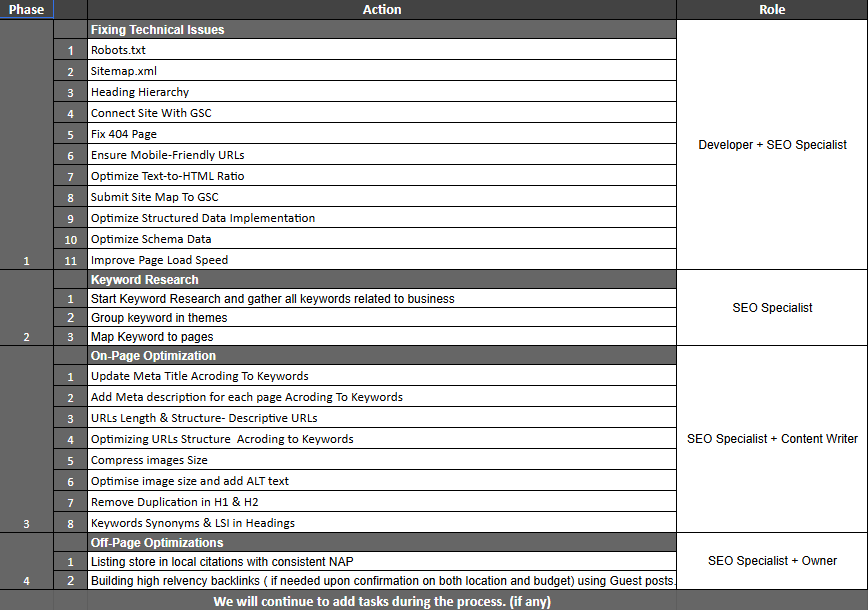
A practical action plan often begins with fixing technical issues such as robots.txt, sitemap.xml, heading hierarchy, Search Console setup, 404 pages, mobile-friendly URLs, text-to-HTML ratio, structured data, schema, and page speed. Then it moves into keyword research, on-page optimization, and off-page tasks where needed.
Step 8: Fix issues one by one
Once the action plan is ready, I move into implementation and work through the issues one by one. That usually means fixing the crawlability and indexation problems first, then improving page speed, metadata, headings, image optimization, URL structure, and other technical areas before expanding into wider on-page and off-page SEO work.
This step-by-step method is far more practical than trying to fix everything at once. It also makes it easier to report progress and show exactly which SEO tasks are complete.
What makes a technical SEO audit actually useful?
A useful audit should do more than point out problems. It should explain priorities, connect issues to business impact, and show what needs to happen next. If a report only lists errors without a path forward, it becomes difficult for clients or teams to implement. That is why I prefer audits that lead naturally into an action plan and then into implementation.
Final thoughts
The best technical SEO audits combine crawling, validation, clear documentation, and execution. If you use the right tools, write your findings clearly, and build a phase-based action plan afterward, the audit becomes something you can actually use to improve the site. That is the difference between an audit that only looks impressive and one that creates measurable progress.
Need a technical SEO audit for your website?
If running a technical SEO audit feels overwhelming, or if you want a clear report with a practical action plan and implementation support, you can contact me on Fiverr for an audit.